1. Git 的安装
上传 Github 的方法有两种,一种是通过 Https 协议另一种是通过 SSH
密钥,两种方法略有差别。参考教学视频:用Git上传代码_哔哩哔哩_bilibili
。视频中的分支为 master 现在 GitHub 默认的是
main 分支,我们需要略微改一下命令。
通过 Https 协议首次上传
通过 Https 协议我们最好是要在 Github 上新建一个 token
具体方法参考:[[如何获取github的token]]
新建仓库
在需要上传的文件夹右键选择 Open Git Bash
here
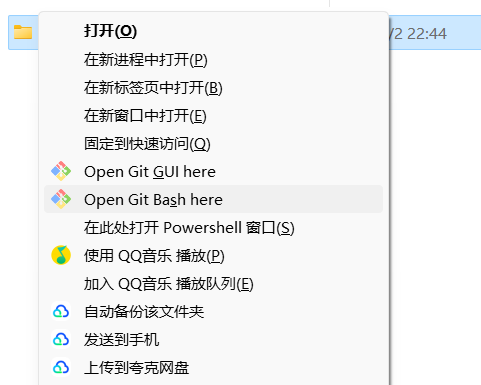 4. 在 Git 窗口执行下面命令
- 完成最后一个命令后会弹出一个窗口,我们选择 token
登录,之后就可以完成上传了。
1
2
| # 创建 main 分支,现在 Github 默认使用 main
git branch -M main
|
1
2
| # 提交文件
git commit -m "first commit"
|
1
2
| # 设置远程仓库 URL, 这里选择你仓库的 URL
git remote add origin https://github.com/your-username/your-repository.git
|
1
2
3
| # 修改上传方式
git remote set-url origin https://github.com/xxx/yyy.git
git remote set-url origin git@github.com:xxx/yyy.git
|
1
2
| # 首次推送,选择这个
git push -u origin main
|
1
2
| # 非首次推送,选择这个
git push origin main
|
1
2
| # 强制推送,如果本地仓库比较旧会报错不然上传,强推送选择这个
git push -f origin main
|
通过 SSH 协议 首次上传
通过 SSH 协议方法我们需要新建一个 SSH 密钥 参考方法:如何生成SSH
key?_ssh key生成-CSDN博客
通过 SSH
密钥使用下面的命令,最后上传不会弹出登录界面可以直接上传。
1
2
| # 创建 main 分支,现在 Github 默认使用 main
git branch -M main
|
1
2
| # 提交文件
git commit -m "first commit"
|
1
2
| # 设置远程仓库 SSH
git remote add origin git@github.com:your-username/your-repository.git
|
1
2
| # 首次推送,选择这个
git push -u origin main
|
1
2
| # 非首次推送,选择这个
git push origin main
|
1
2
| # 强制推送,如果本地仓库比较旧会报错不然上传,强推送选择这个
git push -f origin main
|
非首次上传
1
2
3
| git add .
git commit -m "second commit"
git push origin main
|
常见问题
1. 如果电脑上已经有一个 Github 账户的 SSH
密钥了,可以使用这个密钥来生成另一个 Github 账户的 SSH
密钥吗?
答案是不行,需要重新生成一对密钥文件,我们需要将原来的密钥文件保存下来,不然新生成的密钥文件会将原来的文件覆盖。当然可以选择保存到另外的位置。
如果需要同一台电脑管理多个 GitHub 账户具体方法参考:多个SSH密钥并存且连接到Github
| adoredee (kangzhiheng.top) 。
简单总结一下上面的这个网页的操作,
- 生成两个 GitHub 账户的密钥然后分别保存下来,公钥用于配置 SSH
,私钥就是电脑的身份证,连接不同 GitHub
账户就需要不同的身份证。常用的账户的
id_rsa 重命名为
id_rsa_normal_github ,不常用的账户的 id_rsa
重命名为 id_rsa_hugo_github ,更多的账户的
id_rsa 取不同的名称就行。
- 将两个密钥保存在路径
用户名/.ssh/ 下,并新建一个
config 文件,输入以下内容。第二个 Host 后面的
xxx 自己取名,记得保存以下。
1
2
3
4
5
6
7
8
9
10
| Host github.com
HostName github.com
User git
PreferredAuthentications publickey
IdentityFile ~/.ssh/id_rsa_normal_github
Host xxx.github.com
HostName github.com
User git
PreferredAuthentications publickey
IdentityFile ~/.ssh/id_rsa_hugo_github
|
- 验证,打开
cmd 输入下面命令,如果提示成功就可以了
1
2
| ssh -T git@github.com
ssh -T git@xxx.github.com
|
- 常用的 GitHub 账户上传没有任何改变,不常用的 GitHub 账户在
git init 并在完成除了推送的命令后,项目里会生成
.git 文件夹,如果没有打开显示隐藏文件夹。将里面的
config 文件进行修改。将 [remote "origin"] 下的
url 后面加上你的 xxx. 其他的不用该。
1
2
3
| [remote "origin"]
url = git@xxx.github.com:your-username/your-repository.git
fetch = +refs/heads/*:refs/remotes/origin/*
|
- 上传
2. 已经采用 masrer 分支上传了,怎么改回
main 分支。
- 可以删除仓库,重新上传一次
- 也可以采用下面的方法改为
main 分支,就是需要新建一个
main 分支,其他的不变。
1
2
3
4
5
6
7
8
| # 查看当前所在分支
git branch
# 当前分支不是 `main` 分支且 `main` 分支存在,切换到 `main` 分支
git checkout main
# 当前分支不是 `main` 分支且 `main` 分支不存在
git checkout -b main
# 推送
git push -u origin main
|
3.
如果自己在远程仓库进行过修改,而本地仓库未进行修改,这时上传会出现错误,不让上传。
 image.png|300
1
2
3
4
| # 1.将远程仓库修改的内容更新到本地仓库:
git pull --rebase origin main
# 2.再进行提交
git push origin main
|
4. 使用 SSH 协议上传出现 22 端口超时问题。http
协议上传出现连接超时问题
解决方法使用 443 端口 + 使用代理,修改
C:\Users\name\.ssh\config
文件,修改配置文件,ProxyCommand 后是
Git\mingw64\bin\connect.exe 的安装位置,7890
是本地代理的端口号
1
2
3
4
5
6
7
| Host github.com
HostName ssh.github.com
User git
PreferredAuthentications publickey
IdentityFile ~/.ssh/id_rsa_normal_github
Port 443
ProxyCommand "F:\Support\Git\install\Git\mingw64\bin\connect.exe" -S 127.0.0.1:7890 %h %p
|